


What mobile first really means
Mobile first here is not “mobile only” or “mobile as a toy.” It’s about doing real work, on site, at speed.
- Create your SIMO.io smart home instance in the SIMO.io app.
- Add rooms and zones; onboard devices as you power them.
- Build scenes, schedules, presence lighting, comfort, and Alarm Groups.
- Invite people with a QR code or email while you’re still on site.
- Update firmware/OTA and review health at a glance.
- Operate locally for predictable, low‑latency control—cloud is an assist, not a crutch.
Want to see the app before you commit? Install it and open the Demo House. Explore flows, scenes, and the overall feel immediately—no hardware required.
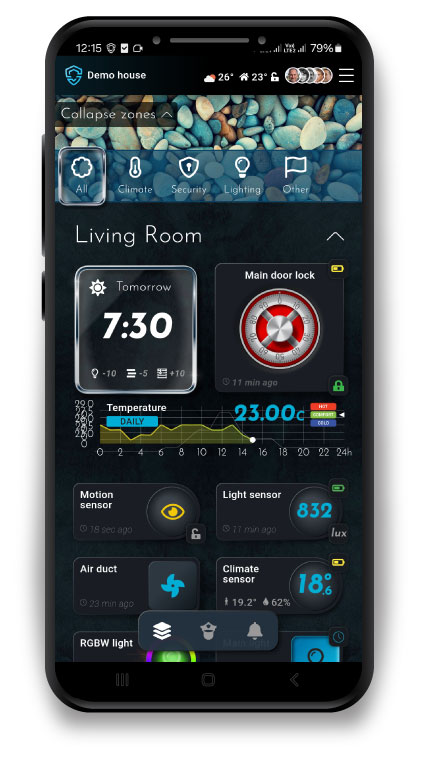
Superuser backed: full power the moment you want it
Mobile is your primary tool; power is your option. The moment you choose to go deeper, the on‑ramp is direct.
- Instances dashboard: every instance you create in the SIMO.io app appears in your web dashboard with name, location, unique identifier, and users.
- One‑click Admin for hub masters: hub masters see an “Admin” button that opens the hub’s Django Admin from anywhere.
- Remote SSH, strictly key‑based: the dashboard shows a ready‑to‑copy command (for example:
ssh -p 25422 root@l1.simo.io). Add your public SSH key to your user in Django Admin; from then on, you can SSH in whenever you need. Fresh hubs ship with no keys (no SSH). Remove keys to revoke access. Sessions are proxied through SIMO.io for reach; on site, you can access Admin over LAN when you’re authenticated.
Developer’s paradise—without forcing anyone into it
The app stays clean for everyday life. The hub stays open for serious work.
- Django/Python friendly: write Django‑based integrations the way you build serious web apps. Extend components, tailor behavior, and contribute—open source means the door is open.
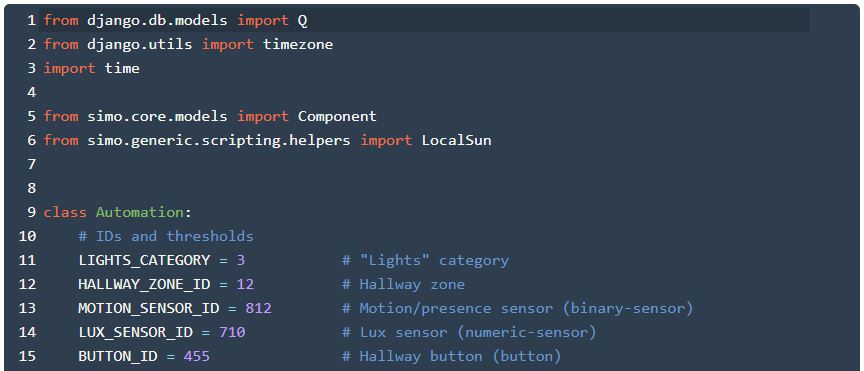
- Script components: for advanced automations, use Script components. Start with a generated draft from the app if you like, then open the code in Django Admin and make it yours. The hub executes locally—power with responsibility.
- Your system, your standards: we don’t ship a “please integrate me” external‑API posture by default. The hub serves people first, not other devices. If you want bridges or services, build them your way—cleanly, openly, and on your schedule.
Roles and precision permissions
SIMO.io’s permissioning is pro‑grade and instance‑aware.
- Hub masters: full authority across the hub’s instances, plus Django Admin and (with a key) SSH.
- Instance superusers: full control over a single SIMO.io smart home instance in the SIMO.io app.
- Roles: configurable at the component level—read‑only or control—so guests, residents, crews, and clients each do exactly what they should.
Invite by QR or email, hand over confidently, and keep the system safe without slowing anyone down.
Backups that respect your time
Break‑glass belongs in every professional system. The SIMO.io hub supports full‑image backup/restore with a dedicated USB thumb drive. If a bad experiment or a failed disk ever happens, you can return to a known‑good state quickly. We’ll publish the detailed how‑to as a separate guide.
Who this favors
- Electricians and integrators: commission whole floors from a phone; hand over with QR invites; return only for upgrades.
- Serious DIYers: predictable results, fewer manual tweaks, clean ceilings—especially with Sentinel consolidating devices.
- Developers and IT pros: jump from mobile to code in seconds. Django Admin and key‑only SSH when detail matters.
Keep building
- Quick Start → /wiki/general-concepts/quick-start/
- SIMO.io hub → /shop/simo-io-fleet/hub/
- Sentinel (room‑level precision) → /shop/simo-io-fleet/sentinel/
- My Instances dashboard → https://simo.io/hubs/my-instances/
- Hub backups & full restore (coming soon)
Quiet, protective, reliable, inevitable. SIMO.io — Smart Home Supremacy.