


Security/Alarm System
Quiet, protective, reliable, inevitable. SIMO.io builds a professional alarm into the fabric of your smart home—no extra panel, no codes, no beeps. You walk away; your home arms itself. You arrive; you unlock, and it disarms. That’s modern security under SIMO.io Smart Home Supremacy.

Why SIMO.io alarm feels different
- Local authority, wire‑first reliability
Runs on your SIMO.io hub. Prefers Ethernet/PoE and wired sensors. Holds steady through internet hiccups and mains outages when paired with a UPS. - Whole‑home by design
Any Component can serve the alarm. Door contacts, motion, locks, lights, water valves, sirens—even a regular light—can become part of your security logic. - Presence‑first, no old‑school delays
Arm on away uses the SIMO.io app’s location plus Wi‑Fi presence. No entry/exit countdowns. If you want to arm manually, do it in the app—it’s instant. - Clear, fast control
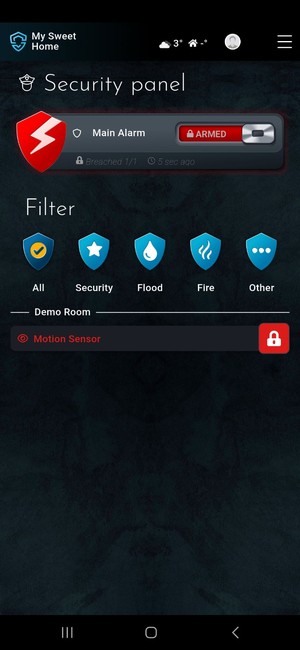
A dedicated Security panel manages everything. One tiny lock at the very top of the app mirrors your main alarm group: locked (armed), unlocked (disarmed), or flashing red (breached). - Professional by default
Wire once. Snap in modules. Scale without rework. Add Sentinel for multi‑role presence and a built‑in siren; smoke certification is underway.

How the alarm thinks (in 90 seconds)
- Components, zones, and categories
In SIMO.io, everything is a Component. Components live in zones (your rooms) and can be grouped by categories (Climate, Lights, Security, Watering, Other—user‑definable). - Alarm categories
Separately, any Component can carry an alarm category: Security, Fire, Flood, or Other. A Component is “alarming” when its value, converted to boolean, is True. - Per‑Component arming
If a Component belongs to any Alarm Group, you can arm/disarm it:- From its tile anywhere in the app: long‑press → Arm/Disarm.
- From the Security panel list: tap to toggle (faster in practice).
- pending‑arm: the device is currently alarming while you’re trying to arm; a small spinner shows on the tile.
- armed: a tiny lock icon appears.
- breached: the tile flashes red (latches until disarm).
- disarmed: normal state.
- Security panel
Appears as soon as you have at least one alarm‑category Component with arming enabled. Lists all alarming Components, filters by alarm category, and shows who armed/disarmed/breached and when.
Alarm Groups explained
Alarm Groups let you treat many Components as one shield—and nest shields into a whole home.
Create one
Components → Add New → Gateway: Generic → Type: Alarm Group.
Include what matters
Add Components and/or other Alarm Groups. This is how you build zones (Basement, Ground Floor, First Floor) and chain them under an “Entire House” group.
Make it the main alarm group (one per instance)
Marking a group as your main alarm group pins its tiny lock at the very top of the SIMO.io app. It also gives SIMO.io’s AI features (e.g., AI script generator, Sentinel voice) a single, reliable source of truth for armed/disarmed/breached state. If you mark a different group as main, the previous one is automatically un‑ticked.
Cascading and bubbling
• Arm/disarm cascades downward: arm the top‑level group and all nested groups arm; disarm it and they disarm. • Breaches bubble upward: if any nested group breaches, parents—including your main group—breach.
Smart arming with presence and locks
Arm on away options:
- No (default)
- Yes
- Yes, but only if at least one arming lock is locked
- Yes, but only if all arming locks are locked
Locks act as conditions; the group actually arms when SIMO.io detects nobody is home (via phone location + Wi‑Fi presence). There are no entry/exit delays—intentional by design.
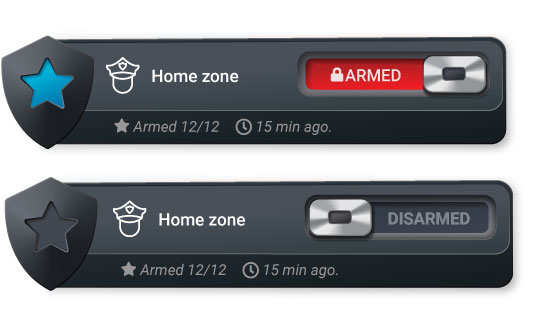
Bypass without losing protection (Security panel workflow)
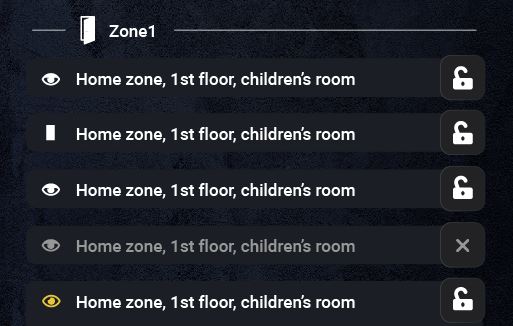
After a group is armed, the Security panel shows that group’s widget at the top. Below it, you see every alarm‑category Component as a compact list: component name on the left, state icon on the right.
- Icons: unlocked = disarmed; locked = armed; spinner = pending‑arm; flashing red lock = breached.
- Tap to toggle: tap any Component in this list to arm/disarm it instantly—no long‑press needed here.
- Typical flow: arm the Alarm Group, then tap any sensors you want to leave unarmed (e.g., a window you’re airing out). Others remain armed. Pending‑arm sensors will arm automatically when they stop alarming (e.g., you close the window).
This keeps protection high while letting you live normally.
Breach events: your playbook on a timeline
Breach events turn a breach into action. Add multiple; they run in parallel as configured.
- Number of sensors breached
Threshold within this Alarm Group. Example: “2” reduces false alarms—two breached sensors must be present. - Component
The thing to control (siren, gate, lock, light, automation script, water valve, etc.). - Breach action
What to do when the event fires (e.g., turn siren on, lock door, close gate, run script). - Disarm action
What to do when the group is disarmed after that event fired (e.g., turn siren off, restore lights). - Delay (s)
The event won’t fire if the group is disarmed within this number of seconds.
Timing and behavior rules
- When does the clock start?
Group notifications: from the first breached sensor—when the group becomes breached. Each event’s Delay: from the moment that event’s threshold (N sensors) becomes true. - Concurrency
All events execute independently and in parallel based on their own delays. - Latching
Once a sensor breaches, it stays breached until you disarm. Disarming the sensor or the group removes it from event evaluation. - Reset logic
On disarm, only the events that actually fired run their Disarm actions. Re‑arming while a sensor is still alarming causes a partial arm; that sensor remains pending‑arm until it clears, and the next alarm requires a fresh breach after arming. - Notify on breach (optional)
“Notify on breach” alerts active users if the group isn’t disarmed within your specified seconds. Leave the field empty to disable in‑app breach notifications.
Five‑minute setup (exact in‑app labels)
- Add your sensors
Components → Add New → Gateway: SIMO.io Fleet → Type: Binary Sensor (or the relevant type). Assign zone and category as you like. Set an alarm category: Security, Fire, Flood, or Other. - Add a siren (example)
Wire a 12 V DC siren to a Relay Module (0.75 mm² / 18 AWG recommended).
Components → Add New → Gateway: SIMO.io Fleet → Type: Switch (the relay driving the siren). - Build an Alarm Group
Components → Add New → Gateway: Generic → Type: Alarm Group.
Include your sensors (and optionally other Alarm Groups). Decide if this is your main alarm group. Configure Arm on away and arming locks if desired. Set “Notify on breach” seconds (or leave blank). - Add Breach events
Example 1: “If 1 sensor breaches → turn on siren (Delay 0 s).”
Example 2: “If 2 sensors breach → lock all exterior doors (Delay 5 s).”
Example 3: “If 1 sensor breaches → turn on all corridor lights (Delay 0 s); on disarm → restore previous scene.” - Arm and test in the Security panel
Arm the group via its slider at the top. Watch sensors beneath it arm live; tap any you want to leave unarmed. Trip a sensor; confirm the breach, notification timing, and actions. Disarm; confirm Disarm actions run.
Real‑world playbooks you can copy
Whole‑house away
- Group: Entire House (main).
- Arm on away: Yes, but only if all arming locks are locked.
- Events:
- 1 sensor → turn siren on (0 s).
- 2 sensors → lock all exterior doors (0 s), close garage door (5 s).
- 1 sensor → turn on exterior lights to 100% (0 s), flash driveway lights (5 s).
- Notify on breach: 15 s.
Perimeter night mode
- Groups: Perimeter (doors, ground‑floor windows), Interior (motions) nested under Entire House.
- Action: manually arm only Perimeter.
- Events: 1 sensor → hallway light to 20% (0 s); siren on (0 s).
- Benefit: move freely inside; secure the shell.
Fire response
- Alarm category: Fire assigned to smoke/heat relays and Sentinel.
- Group: Fire (top‑level and included inside Entire House).
- Events:
- 1 sensor → unlock all doors (0 s), turn siren on (0 s), turn on all lights (0 s).
- 1 sensor → cut HVAC (0 s), open motorized vents if present (0–2 s).
- Notify on breach: 0 s (immediate).
- Note: smoke certification for Sentinel is underway.
Flood containment
- Alarm category: Flood on leak sensors.
- Events (Flood group):
- 1 sensor → close main water valve (0 s), send notification (10 s if not disarmed).
- 2 sensors → cut power to washing machine outlet via Relay Module (0 s).
- Benefit: limit damage even when you’re away.
Garage safety
- Sensors: door contact, motion.
- Events:
- 1 sensor (door forced) → siren on (0 s), garage light 100% (0 s), close door (5 s).
- Disarm → siren off, restore lights.
Senior‑care check‑in (gentle pattern)
- Group: Care.
- Events: 1 sensor (bathroom motion absent + door contact closed for long period via separate automation) → send notification (0 s), flash bedside light (0 s).
- Benefit: peace of mind without cameras.
Short‑let turnover
- Groups per apartment/zone; locks are arming locks.
- Arm on away: Yes, but only if at least one arming lock is locked.
- Events: 1 sensor → notify host (0 s); if 2 sensors → siren (0 s); on disarm by staff → run cleaning scene.
Pro wiring and reliability notes
- Prefer wired sensors
Use door/window contacts, PIRs, glass‑break mics, leak probes, smoke/heat relays via SIMO.io Binary Input Modules. Keep runs clean and labeled. - Siren wiring
12 V DC siren on a Relay Module. Typical loop wire: 0.75 mm² / 18 AWG. Confirm current draw; use a dedicated fused supply if needed. - Power and network resilience
Put the SIMO.io hub, PoE switch, and router on a UPS. SIMO.io’s local‑first design keeps core alarm functions running even if the internet is down. - Sentinel as a compact perimeter
Sentinel offers precise 3D presence plus a built‑in siren and a dust/pollution detector designed to resist false alarms. Smoke certification is in progress.
- Label every input.
- Trip every sensor once; verify it appears in Security panel with the right alarm category.
- Test “Arm on away” with phones leaving Wi‑Fi and the geofence.
- Simulate breach; verify each event, delay, and notification.
- Document who has arming rights.
Regulations differ by region. If you need monitored, certified systems (e.g., UL/EN50131), verify local requirements and integrate accordingly.
FAQs
What counts toward “Number of sensors breached”?
Sensors inside this Alarm Group that are currently in a breached state.
When does the “Notify on breach” timer start?
At the first breached sensor—when the group becomes breached.
When does an event’s Delay start?
When that event’s threshold (N sensors) becomes true.
Can I bypass a single sensor?
Yes. After the group is armed, go to the Security panel and tap that sensor in the list to disarm it. Others remain armed. You can also long‑press its tile elsewhere in the app.
What’s the difference between pending‑arm and breached?
Pending‑arm appears while arming if a sensor is already alarming (e.g., window open). Breached is a latched state that occurs after arming when a sensor trips; it clears only on disarm.
What happens if phones have location off or leave Wi‑Fi on?
You can always arm/disarm manually in the app. If “Arm on away” is enabled, it evaluates with the presence signals available (phone location and Wi‑Fi presence).
How many main alarm groups can I have?
One per SIMO.io smart home instance. Marking a new main group un‑ticks the previous one automatically.
Do breaches in nested groups affect the main group?
Yes. Breaches bubble up to parents, including the main group.
Do Disarm actions run if an event never fired?
No. Only events that actually fired run their Disarm actions.
SIMO.io is built on a posture, not a pitch: wire‑first, local‑first, professional by default. The alarm is not a bolt‑on—it’s your home’s quiet authority, running on your SIMO.io hub, with Components and Alarm Groups you can see, prove, and trust. Walk away and it arms. Return and it yields. No noise. No guesswork. Just Smart Home Supremacy.